 Fokus
How do I block websites only during working hours on Mac?
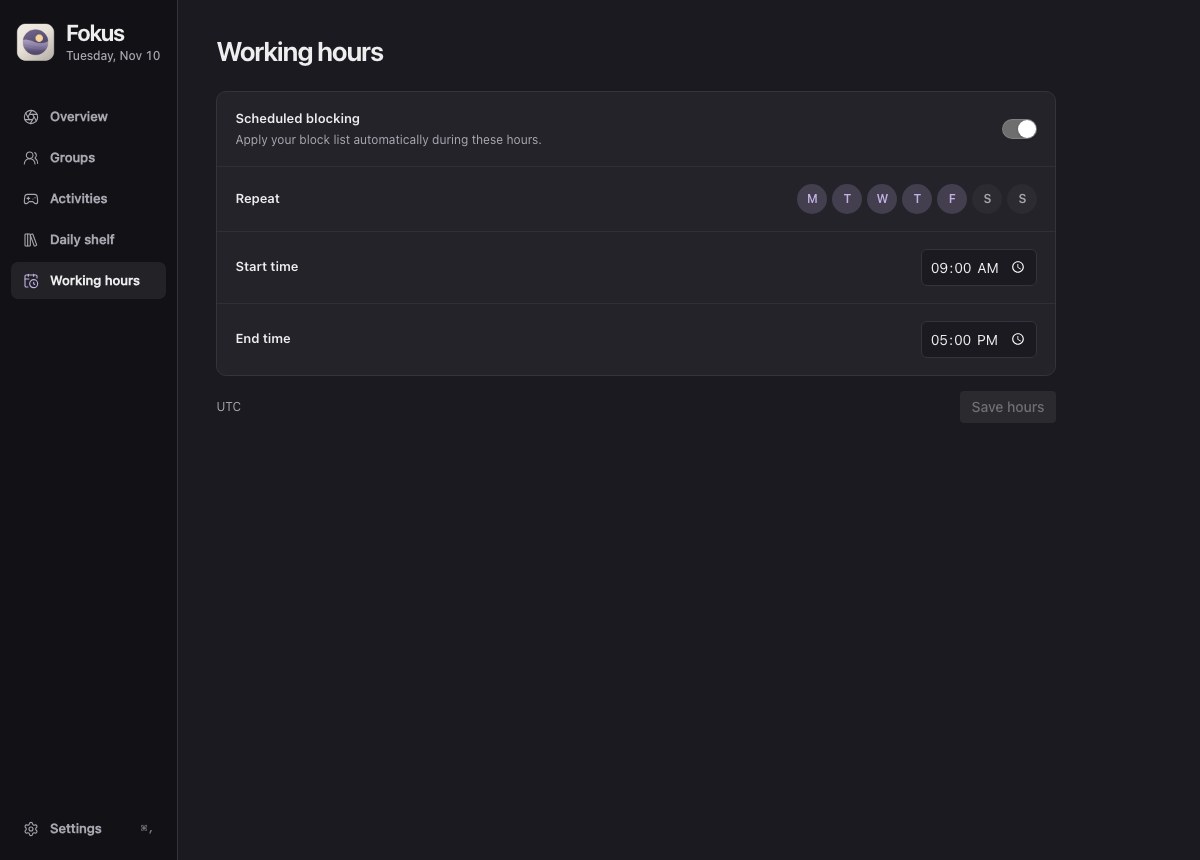
Open Working hours in Fokus for Mac and turn on Scheduled blocking. Select the days, enter the start and end times, then choose Save hours. Enabled groups follow this schedule in your Mac’s local time zone.
Fokus · · Tested with Fokus 0.4.0 for Mac
Choose your sites
In Groups, enable the list you want blocked at work. For this example use Social media, which includes Reddit, X and Instagram.
Set the start and end of your shift
Select Monday through Friday in Working hours. Set Start time to 9:00 AM and End time to 5:00 PM, then save. For an overnight shift, enter an end time on the following morning.
Check Overview at the end of the day
Enable blocking and approve the local helper. During work hours, Overview shows how many sites are blocked and when the session ends. Afterward it shows Off the clock, unless you started a separate timed session.
What happens at the end of a shift?
We set a one-minute shift on our test Mac. The 0.4.0 helper added all three domains to a disposable hosts file at the start. At the end, only the file’s original localhost entry remained.
| Schedule state | Selected sites blocked |
|---|---|
| Before the schedule | 0 of 3 |
| During work hours | 3 of 3 |
| After work hours | 0 of 3 |
One recurring schedule applies to the enabled groups in this preview. For Mac-wide downtime, Apple also offers System Settings → Screen Time → Downtime. Apple’s Screen Time instructions for Mac
Try setting your working hours